Monday, 7 October 2019

Split stakes in Stronghands-Qt using Send dialog

This guide uses the newer Stronghands v07301wallet, this has a minor change to allow using duplicate addresses in the Send dialog.

The PoS rewards structure of Stronghands is best utilized by splitting your inputs, these inputs will take longer to stake (than larger size), but will increase the number of stakes over time (because you have more of them).
a rough example
If you have 100,000 coins, it might stake quickly in just over 30 days - this might give you 12 stakes/year
but if you split into 10 x 10,000 coins they might take 3 months, but because you have 10, you might end up with 40 stakes/year


This guide does not cover using coin control, but it is recommended to use coin control to ensure you are splitting the correct coins.

If I have three inputs of 100,000 and 5,000 and 5,000. Using coin control can be used to specify I split the 100,000.
otherwise it is quite possible for the the smaller coins to be used and the 100,000 not be touched.

Coin Control is similar between most wallets, it can be enabled in the Preferences / Display settings.
Here is a guide for EXCL which may be of some assistance in understanding
https://bumbacoin.blogspot.com/2019/06/how-to-use-coin-control-to-send-coins.html


BACK TO THE TASK AT HAND !!


Sunday, 30 June 2019

Create ExclusiveCoin rawtransaction

This post will assume certain knowledge and will skip some steps.
We will work with the windows-qt, but the process is basically similar across platform/builds.

It is possible to create rawtransations that are invalid, or from any input not mine, this article will use currently available inputs.

NOTE:
I successfully created and sent a 2 in 1 out rawtransaction using zero fee.
however attempting a 2 in 2 out resulted in fails while using up to 1 EXCL in fee, I did not test any higher and have no idea about any other variations.


there are three basic steps,
1) createrawtransaction
2) signrawtransaction
3) sendrawtransaction

Using listunspent will give you a current list of available inputs,


1)                                    
I will use the last two. All we need is the txid, vout and value.
        "txid" : "fe59b03a782aa6a393f2a5d7fa58df0a431644ad3edecac14ae05ffa838948b6",
        "vout" : 1,
        "amount" : 44.25000000,

        "txid" : "fe7eba5f0d567accd27fdca08f3f83724f5143b3fb46cdd915819bbc2438c030",
        "vout" : 1,
        "amount" : 28.08000000,

entering createrawsation in the console gives the basic format as
[{"txid":txid,"vout":n},...] {address:amount,...}
now you will actually find this doesnt work as the " are special characters and will need some extra fuckery.
there are a couple ways of handling the fuckery both of these should work ok
'[{"txid":txid,"vout":n},...]' '{"address":amount,...}'
"[{\"txid\":txid,\"vout\":n},...]" "{\"address\":amount,...}"


filling in the input data gives
'[{"txid":"fe59b03a782aa6a393f2a5d7fa58df0a431644ad3edecac14ae05ffa838948b6","vout":1,"txid":"fe7eba5f0d567accd27fdca08f3f83724f5143b3fb46cdd915819bbc2438c030","vout":1}]' {address:amount,...}

the two inputs give a total value of 72.33 EXCL
any amount that is not sent in the next section will become the transaction fee
so if I only sent 42 to myself 
example
'{"EZYdgoGwqhvGxKZuWRRZjEzfQS7oi2H6YE":42}'
then the remaining 30.33 EXCL will go to the miner.

so I will include most of the coins instead and enter into rpc console

createrawtransaction '[{"txid":"fe59b03a782aa6a393f2a5d7fa58df0a431644ad3edecac14ae05ffa838948b6","vout":1,"txid":"fe7eba5f0d567accd27fdca08f3f83724f5143b3fb46cdd915819bbc2438c030","vout":1}]' '{"EZYdgoGwqhvGxKZuWRRZjEzfQS7oi2H6YE":42,"EcArdpTnA47ZSNM2TLELFPUXsJkiy63Gyk":30.33}'

response
010000009f99195d01b6488983fa5fe04ac1cade3ead4416430adf58fad7a5f293a3a62a783ab059fe0100000000ffffffff0200ea56fa000000001976a914b3ce628b3a22911b42d3a33b50eba720dab8252988ac40e8c7b4000000001976a914d0986b8ba8854573452664eb4ba0850dfb2ce24e88ac00000000

2)                                    
signrawtransaction 010000009f99195d01b6488983fa5fe04ac1cade3ead4416430adf58fad7a5f293a3a62a783ab059fe0100000000ffffffff0200ea56fa000000001976a914b3ce628b3a22911b42d3a33b50eba720dab8252988ac40e8c7b4000000001976a914d0986b8ba8854573452664eb4ba0850dfb2ce24e88ac00000000

response
{
    "hex" : "010000009f99195d01b6488983fa5fe04ac1cade3ead4416430adf58fad7a5f293a3a62a783ab059fe0100000049483045022100d937eec63ec6939ed2f5cd4f26c7d1dff3badf28baa0bb50cc2c94aeb4869eb002207d36a7d518e81b83fd6940813b829f737551e38968cb188b81b1dd0e7633134b01ffffffff0200ea56fa000000001976a914b3ce628b3a22911b42d3a33b50eba720dab8252988ac40e8c7b4000000001976a914d0986b8ba8854573452664eb4ba0850dfb2ce24e88ac00000000",
    "complete" : true
}
3)                                   
sendrawtransaction 010000009f99195d01b6488983fa5fe04ac1cade3ead4416430adf58fad7a5f293a3a62a783ab059fe0100000049483045022100d937eec63ec6939ed2f5cd4f26c7d1dff3badf28baa0bb50cc2c94aeb4869eb002207d36a7d518e81b83fd6940813b829f737551e38968cb188b81b1dd0e7633134b01ffffffff0200ea56fa000000001976a914b3ce628b3a22911b42d3a33b50eba720dab8252988ac40e8c7b4000000001976a914d0986b8ba8854573452664eb4ba0850dfb2ce24e88ac00000000

response
TX rejected (code -22)

lol. it's cos of the tx fee.
using a single output allows a zero EXCL fee,

createrawtransaction '[{"txid":"fe7eba5f0d567accd27fdca08f3f83724f5143b3fb46cdd915819bbc2438c030","vout":1}]' '{"EZYdgoGwqhvGxKZuWRRZjEzfQS7oi2H6YE":28.08000000}'

but with the above 2 in 2out tx I tested up to 1 EXCL and it's still being rejected.
so
the outcome is the method above works but you will need to include a correct txfee for it to work.


ALSO
it's possible to create an invalid or otherwise rejected transaction.
possible reasons may be, input is already spent, value out exceeds value in, not enough fees.


Exclusive Coin swap.

The ongoing EXCL user swap will be handled by a dedicated swap site.
Before we discuss the swap site it's useful to consider how it will work.

Each EXCL v2 address has it's own snapshot balance.
You will send coins from your EXCL v2 address.
Your swap transaction will be analysed, and if valid then new coins will be sent to a new v3 address.

Important points
Each swap transaction must come ONLY from one address.
This address MUST have a snapshot balance.

If either of these two points are not met, then the swap will fail.
You will find a selection of articles to assist you with each stage.

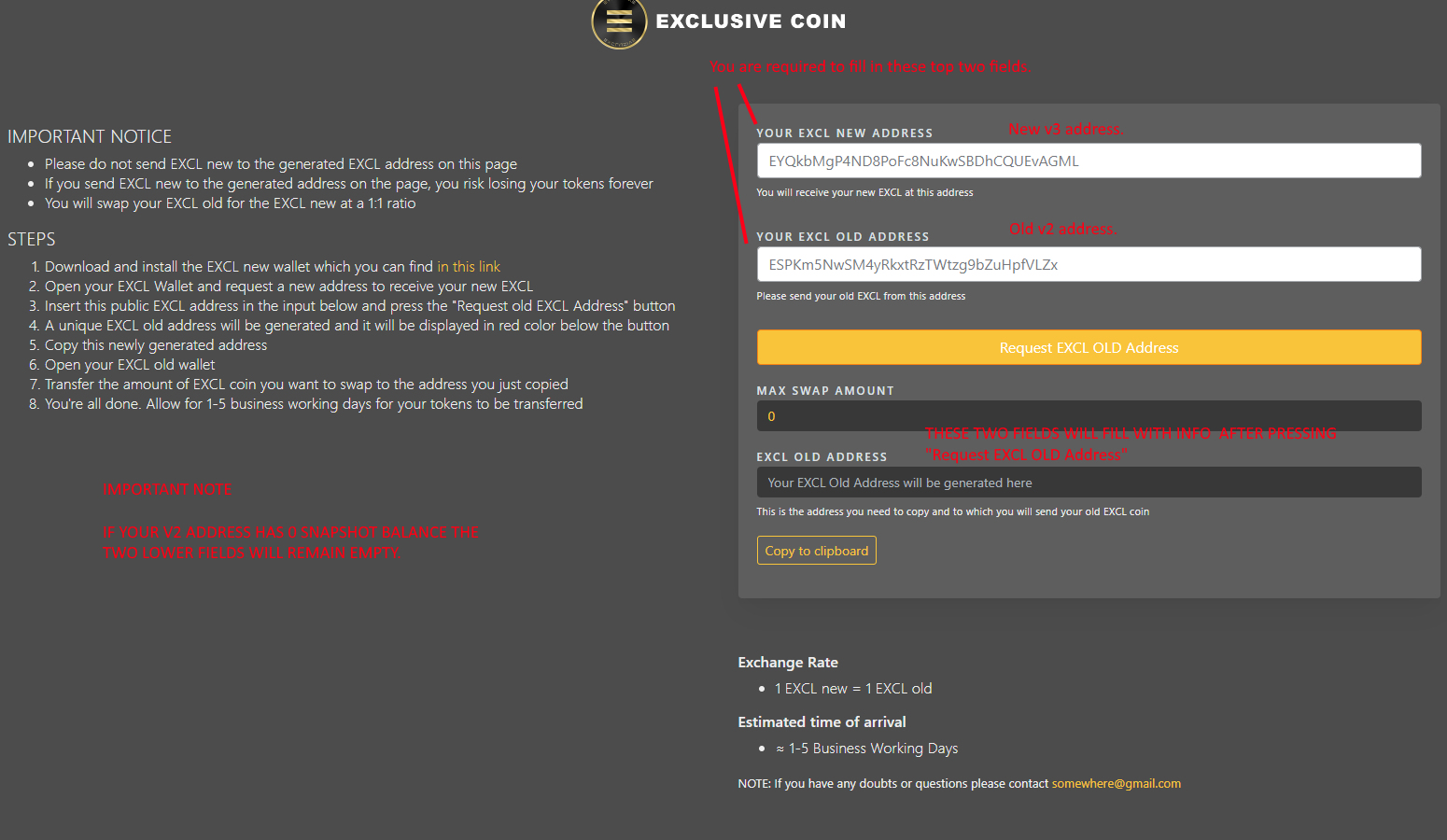
Let's look at the swap site

You will be filling in the top two fields.
"YOUR EXCL NEW ADDRESS" - this is a new v3 address
"YOUR EXCL OLD ADDRESS" - this is your old v2 address

Once you have entered those you will press
"Request EXCL OLD Address"


If your EXCL Old Address has a snapshot balance then the two lower fields will auto fill,
you can see my address has a "MAX SWAP AMOUNT' balance of 3431.050... EXCL v2,
and the swap site gives me a deposit address to send.

"MAX SWAP AMOUNT"  is the snapshot balance of your address. This is the maximum amount of coins you are able to swap from the address entered.

If these two areas remain empty, this means there are no coins in that snapshot address.
If this figure does not match your current wallet balance refer to this article My ExclusiveCoin snapshot balance is not correct 

Now you can send coins to the swap address.
This you will do like a normal transaction but there are a few important things to consider and remember.
-If you will be combining many small transaction (example, if you have been staking for some time) it will be useful to combine these small amounts first, then send your swap amount in a single amount.
-YOU MUST only send coins from the one address entered.
-YOU MUST send the swap amount, if you send less, you will need to do another transaction, if you send extra you will not be credited.

To ensure you send coins from the single corrent address, please use coin control.
Coin Control can group different addresses together so PLEASE ENSURE YOU FULLY EXPAND YOUR ADDRESS.
Please refer to this article How to use Coin Control to send coins for Exclusivecoin swap.

If all has succeeded, you will receive new v3 coins.The time taken to receive coins maybe a couple days as this process can involve manual processing., please be patient

I hope this article (and others) is helpful, please come to discord for further information.


---

To check your snapshot balances please refer to this article Check your ExclusiveCoin snapshot address balance.


Useful links

swap site - http://swap.exclusivecoin.pw/

v3 explorer - http://explorer.exclusivecoin.pw/ or https://chainz.cryptoid.info/excl/
v3 wallets - https://github.com/exclfork/excl-core/releases

v2 explorer - https://chainz.cryptoid.info/excl-old/ -- this explorer has stopped around snapshot height, you can use this to verify your snapshot balances, but not for any current transactions
v2 wallets - https://github.com/exclfork/ExclusiveCoin/releases
v2 snapshot - http://62.113.207.179/exclchain/

Thursday, 27 June 2019

My ExclusiveCoin snapshot balance is not correct !!

This post is focusing on what happens when your snapshot coins do not match your expected balance.
(snapshot occurred 14th April 2019 at block 1,845,936)


The swap payment will be based on the stored snapshot for each address, and will be a 1:1 match of v2, if you find yourself in one of the situations below you need to match your pre-snapshot balance.


Here are some examples of what may have occurred.
1) The simplest explanation is that  you have several addresses in your wallet, but are only looking at one.
Continue reading to see various methods to determine your possible addresses.

2)  you have been staking or running a MasterNode after the snapshot and your current balance is higher than the snapshot balance
__ any coins generated after the snapshot will not be recognised by the snapshot and you will not receive any swap coins.
you will need to calculate your own balance and decide if it usefully matches the snapshot.

3)  you moved your coins after the snapshot, now your current address balances do not match the snapshot.
__ this scenario has several complex possibilities to it and your situation may not be covered.


How to check which addresses you own

firstly, check your total snapshot balance,
you may find your total matches, but address do not. The you will need to move coins to adjust to correct balance.

otherwise  you may find your total incorrect, in which case you will need to find which addresses you owned at the snapshot, send coins back to those addresses.

the simplest method may be to scroll through your transaction tab, compile a list of addresses, then check on explorer.
if you have named your addresses, you can copy the actual address by right clicking on the transaction and 'Copy address', then paste wherever you need.


if you want to name an address, you can right click on a transaction and select 'Edit label'

an alternative method to collect addresses is by using the console.
to open the console, select the Help menu > Debug window


enter the command 'listaddressgroupings' then press return

now, you can check each of your addresses against the explorer to discover which need to be funded.
remember to use coin control if you find it helpful.

https://bumbacoin.blogspot.com/2019/06/how-to-use-coin-control-to-send-coins.html


Wednesday, 26 June 2019

Check your ExclusiveCoin snapshot address balance.

Exclusive Coin v2 snapshot occurred 14th April 2019 at block 1,845,936, this means over 82,000 new blocks and new coins exist on the current v2 chain.
These extra coins are not recognised by the snapshot, and your local balance may not match the snapshot balance

To confirm your address balance you may check using this explorer https://chainz.cryptoid.info/excl-old/

Let us check the addresses from my earlier post on using coin control, here is an image of my addresses

it shows three addresses
EZYdgoGwqhvGxKZuWRRZjEzfQS7oi2H6YE
ESPKm5NwSM4yRkxtRzTWtzg9bZuHpfVLZx
ELMspMJhrqFahRqqJbTqSQFhT3wSD93r7w

the bottom two were both created after the snapshot and therefore do not exist on the v2 explorer showing this screen

while the first address shows a balance of 8420 EXCL, but on the explorer shows a balance of 3423 EXCL


In this case, if I checked my original screen shot I would expect 8,630 EXCL from the snapshot but then in reality I would only be receiving 3,432 EXCL from the snapshot.


Tuesday, 18 June 2019

How to use Coin Control to send coins for Exclusivecoin swap.

For the ExclusiveCoin mandatory swap from v2 to v3 you will be required to send v2 coins from a single address in a single transaction.
If you have 3 addresses, you will be required to send 3 seperate transactions, each one from a single address.

You can use coin control existing inside the qt wallet to specify the individual send address.

Please note, if you want to run v2 and v3 wallets at the same time, please see note at the bottom of this article.

To enable coin control follow these steps.

1. Click on settings >> Options ...


2. Select Display tab >> Select "Display coin control features ..." >> Press OK


3. Select Send tab
>> Press "Inputs..." button, this will bring up coin selection dialogue , this example uses Tree mode
>> On the left is an expandable view of all your available inputs, ensure you select inputs from one single address.
PLEASE MAKE SURE YOU HAVE EXPANDED THE ADDRESS. The wallet will also nest different change addresses, so it's necessary to ensure there are no other address selected.


4. You can see displayed information regarding your input selection, "After Fee" is how much you have available to send
>> Enter the v2 swap address you were given by the swap site
>> send your swap coins, remember your swap rate is based on the snapshot balance of the input address NOT how many coins you send (see below for more info)
>> Press send.


more info regarding swap.
a snapshot was created at block 1845936, you will be swapped ONLY for coins available at that height.

in my examples there are 100 coins in that address,
if the snapshot balance is 100 coins the swap site will send me exactly 100 coins.
if i have been staking and send 120 coins, i will receive 100 coins.
if i send 5 coins, i will receive 5 coins.

any transactions past block 1845936 will not exist and will not affect swap.
if you have staked past block 1845936 then the new coins will not exist in the snapshot and will not be swapped
if you have moved coins after block 1845936 you will still need to send from your early address
if you test the swap process and your change goes to a new address, you will have to send it back to your snapshot address to complete the swap.

running v2 and v3 wallets at the same time
both wallets use the same port number, so it will be required to specify v2 wallet to use a different port number.
you will need to edit the exclusivecoin.conf file and add

port=23235

handy links

v3 explorer - http://explorer.exclusivecoin.pw
v3 wallets - https://github.com/exclfork/excl-core/releases

v2 explorer - https://www.cryptobe.com/chain/ExclusiveCoin - any balances past block 1845936 will be ignored for swap purposes.
v2 wallets - https://github.com/exclfork/ExclusiveCoin/releases
v2 snapshot - http://62.113.207.179/exclchain/

Sunday, 6 January 2019

built in windows 10 checksum utility


shameless copied from
https://superuser.com/questions/245775/is-there-a-built-in-checksum-utility-on-windows-7


CertUtil is a pre-installed Windows utility that can be used to generate hash checksums:
certUtil -hashfile pathToFileToCheck [HashAlgorithm]
HashAlgorithm choices: MD2 MD4 MD5 SHA1 SHA256 SHA384 SHA512
So for example, the following generates an MD5 checksum for the file C:\TEMP\MyDataFile.img:
  CertUtil -hashfile C:\TEMP\MyDataFile.img MD5

Friday, 21 December 2018

Using your existing copy of the Exclusive Coin blockchain to sync the new clients.


This document is to assist users in modifying their current copy of the blockchain to enable a fast re-sync with the new client.

The new client has new protocol rules, so it will only accept blocks that conform with the new settings. This means it will only scan the bootstrap up to the fork block and then stop.

It is important to remember that you are modifying files in the data directory that holds your wallet keys so care is needed when deleting and renaming files.

The basic steps involved are,
1.going to you data directory
2.backing up files for safe keeping
3.deleting one folder
4.renaming one file

---

1. The default location for your Exclusive Coin data directory can be found on windows in 
%appdata%/roaming

or on macOS 
~/Library/Application Support

You many find any other crypto currency wallets you might have in this folder.

If you are 100% paranoid and concerned, you can back up the entire data directory before changing files.


2. Once you have entered your ExclusiveCoin folder you will see an assortment of files.

Back up the file wallet.dat somewhere safe. if you do something terrible during the next few steps you can restore your wallet from this backup.


3. Delete the folder named txleveldb, also the file mncache.dat.


4. Rename blk0001.dat to bootstrap.dat

Now you may start the new wallet, it will scan the bootstrap file and sync up to the fork block, then it will connect to the network as normally.


..

deleting the file mncache.dat is not necessary for bootstrap. but due to other updates in EXCL all users are recommended to do so.


.


Thursday, 3 May 2018

CMake 3.10.1 bootstrap fails on Mac OS X 10.8.5 with "Cannot find a C++ compiler supporting C++11 on this system."

my error was exactly the same as this https://gitlab.kitware.com/cmake/cmake/issues/17639

solution,
edit cmake.rb
(somewhere in usr/local/Homebrew/Library/taps/homebrew/homebrew-core/Formula)

add
ENV["CXXFLAGS"] = "-std=c++11 -stdlib=libc+

before the execution of bootstrap.


Sunday, 29 April 2018

The following packages have unmet dependencies: nodejs : Conflicts: nodejs-legacy

while setting up an iquidus explorer i just hacked my way to nodejs-legacy installing freedom through sheer elan ... maybe


after being given access to someone elses pre-loved server,
was getting error whilst trying to install nodejs-legacy
The following packages have unmet dependencies:
 nodejs : Conflicts: nodejs-legacy

not entirely which bit was the real magic but after an extended duration of getting constant rejections this is hopefully the bare basics,
possibly it's more than everything necessary.
remove nodejs, install nodejs from nodesource, change package manager priority to ubuntu servers, upgrade nodejs, install nodejs-legacy


remove current nodejs
# apt-get remove nodejs

update etc
# apt install -f
# apt update
# apt dist-upgrade

install nodejs v10 from the horses mouth (ie nodesource itself)
# curl -sL https://deb.nodesource.com/setup_10.x | sudo -E bash -
# apt-get install nodejs -y

..
etc
..

# nodejs -v
v10.0.0

adjust priority to ubuntu servers and upgrade to v10.25
# apt-cache policy nodejs
nodejs:
  Installed: 10.0.0-1nodesource1
  Candidate: 10.0.0-1nodesource1
  Version table:
 *** 10.0.0-1nodesource1 0
        500 https://deb.nodesource.com/node_10.x/ trusty/main amd64 Packages
        100 /var/lib/dpkg/status
     0.10.25~dfsg2-2ubuntu1 0

        500 http://archive.ubuntu.com/ubuntu/ trusty/universe amd64 Packages
# nano /etc/apt/preferences.d/nodejs

.. in my case i gave archive.ubuntu.com a higher value by adding the following
Package: *
Pin: origin archive.ubuntu.com
Pin-Priority: 1002
..

# apt-cache policy nodejs
nodejs:
  Installed: 10.0.0-1nodesource1
  Candidate: 0.10.25~dfsg2-2ubuntu1
  Version table:
 *** 10.0.0-1nodesource1 0
        500 https://deb.nodesource.com/node_10.x/ trusty/main amd64 Packages
        100 /var/lib/dpkg/status
     0.10.25~dfsg2-2ubuntu1 0
       1002 http://archive.ubuntu.com/ubuntu/ trusty/universe amd64 Packages

re-install and success !!
# apt-get install --reinstall nodejs 

.. updates nodejs ..

# apt-get install nodejs-legacy


discussion on raising the package priority
https://github.com/nodejs/help/issues/1040#issuecomment-362970187

Tuesday, 10 April 2018

updating TLS protocol for git on Mountain Lion using Macports


apparently github has deprecated older TLS protocols,
when attempting to use git geting error

fatal: unable to access 'https://github.com/git/git/': error:1407742E:SSL routines:SSL23_GET_SERVER_HELLO:tlsv1 alert protocol version

seemingly the answer is to upgrade curl (which also updates openssl), and git

BEFORE
$ curl --version
curl 7.24.0 (x86_64-apple-darwin12.0) libcurl/7.24.0 OpenSSL/0.9.8y zlib/1.2.5
Protocols: dict file ftp ftps gopher http https imap imaps ldap ldaps pop3 pop3s rtsp smtp smtps telnet tftp 
Features: AsynchDNS GSS-Negotiate IPv6 Largefile NTLM NTLM_WB SSL libz 

$ sudo port install curl
...now is downloading and installing etc etc etc ...


AFTER
open new window
$ curl --version
curl 7.59.0 (x86_64-apple-darwin12.6.0) libcurl/7.59.0 OpenSSL/1.0.2o zlib/1.2.11 libidn2/2.0.4 libpsl/0.20.1 (+libidn2/2.0.4)
Release-Date: 2018-03-14
Protocols: dict file ftp ftps gopher http https imap imaps pop3 pop3s rtsp smb smbs smtp smtps telnet tftp 
Features: AsynchDNS IDN IPv6 Largefile NTLM NTLM_WB SSL libz TLS-SRP UnixSockets HTTPS-proxy PSL

also necessary seems to be updating git, the latest available for Mountain Lion is too old

BEFORE
$ git --version
git version 2.3.5

so it becomes necessary for downloading https://github.com/git/git, going into such directory and making


AFTER
$ /Volumes/whereever/new/version/is/git --version
git version 2.17.GIT

using this newly made version is now succesful for such as cloning

$ /Volumes/whereever/new/version/is/git clone https://github.com/git/git


installing via command line is not effective ($ make install), the version of git is not updated in this case.
so i will have to sort that out later ..

Saturday, 3 March 2018

Importing your address into a new wallet-qt.

For whatever reason, there are times you need to import your address into another wallet. 

This post will go through three steps, your situation may not match these steps so please pick and choose your information as necessary.

1. exporting your private key

2. creating a new empty wallet

3. importing your private key

These steps will be addressed very simply and will require some prior knowledge, please see this post which includes much more information about similar material
https://bumbacoin.blogspot.com.au/2015/10/cleaning-up-your-wallet-qt-when-it.html

                                                                                     
1. get your address, dump private key

I will assume you already know your address,  this post will use the address B8QX8peKA9LvDb4Ya5GaMWwwLQoukV2aRY
so now you go into the debug/console
please enter command (using your address
> dumpprivkey B8QX8peKA9LvDb4Ya5GaMWwwLQoukV2aRY

you will need to copy the output somewhere safe, you will need this to import into a new wallet.
the private key in this case is
Pe69Ten35qDWqc5cHbGEZfG5bq9npRtY8WkjXAvfGGaJiUQMFo63


now close your wallet-qt

                                                                                     
2. enter your datadirectory, the bumbacoin datadirectory on my computer looks like this


you will notice i have a highlighted file, wallet.datBAK and a wallet.dat, in this case wallet.datBAK is a prior backup i have made, and wallet.dat is the file that currently holds my address,
i now need to delete or rename the file wallet.dat
then when the wallet-qt starts it will generate a new empty wallet.dat file.

                                                                                     
3. open the wallet-qt, it will now create an empty wallet,
once again open the debug/console, this time you will import the private key from step 1.
at this point you can give the address an optional name, 

> importprivkey Pe69Ten35qDWqc5cHbGEZfG5bq9npRtY8WkjXAvfGGaJiUQMFo63 newaddress

this will take some time as it scans the database for transactions. please wait.


you have now imported the key, congratulations ;)

----

it is possible that the wallet did not pick up all transactions and you are missing some, you can repeate the process as many times as you like and it should work.

alternatively, if you have 1000's of transactions, it may be better to start up with -rescan
or re-sync the entire chain and let it pick up each transaction.
that is a different post though

Tuesday, 26 September 2017

useful crypto links

The following is a list of some prefixes which are in use in the reference Bitcoin codebase.
Base58 leading prefixes for coin addresses
https://en.bitcoin.it/wiki/List_of_address_prefixes

universal paper wallet generator.
http://cryptolife.net/upwg/

python script to generate burn addresses
https://gist.github.com/CoinWhisperer/6d673f1f3d13da1611cd

scripts to auto-compile linux wallets etc
https://github.com/okcashpro/ok-scripts

Tuesday, 22 August 2017

guide to staking,

The blockchain is a succesion of generated blocks, each block contains a number of transaction informations.

Proof of Work requires some computing power to generate these blocks, as the difficulty increases the computing power necessary increases, only some form of hardware (computing power) is required. A high difficulty network requires a large amount of computing power.

Proof of Stake also requires some computing power, but also requires some coins to be held. This requirement of holding coins creates a process which is far less computing intensive, even on a high difficulty network generic computers are sufficient.

Proof of Work can require substantial investment in computing power.
Proof of Stake can require substantial investment in purchasing coins.


A simple explanation to Proof of Stake : if you hold coins in your wallet whilst leaving it open, unlocked and online, your wallet will occasionally mine/stake/generate a block, this is added to the blockchain and you will receive a reward.


When a coin wallet is mining using Proof of Stake it needs to be online, unlocked, and have eligible coins available.

Inputs : Every transaction creates inputs and outputs, deposits are inputs and withdrawls are outputs, the inputs are the coins that are in your wallet. Also known as UTxO's

Eligibility : each PoS currency will have a Minimum Stake Age, (ExclusiveCoin is 24 hours, PeerCoin is 30 days) once an input is that old it will become eligible to stake.

Mining : Whilst staking your computer is doing work, similar to Proof of Work mining but vastly reduced,
each second all available inputs are hashed to create an output which is compared against the current network difficulty, if the hash is a good number your wallet will create a block and send it to the network.

Probability : each input has a probability of a succesful hash, the probability is based on the input characteristics.
ExclusiveCoin uses the input size (how many coins) and it's age, the greater those numbers the greater the probability and the more likely you are to generate a block.

Orphans : when you generate a block, it is possible that another block will be accepted by the network in preference to yours, your block then becomes an orphan and will appear in your wallet greyed out and with 0 confirmations.

Block creation : when you create a block the wallet will automaticatlly do a number of things, including adding all the unconfirmed transactions from the network, and creating a new transaction which is the stake/minting transaction.

Split/Combine stake transaction : the wallet is programmed with values of a target size for staking inputs, what this means is that it will modify each staking input to fit within the programmed values.
If the current input is lower, it will combine with other staking inputs, and if it is lower, it will split in half.


example.
i withdraw 250 EXCL coins from an exchange to my wallet, 
when that transaction is included in the blockchain, that transaction will become my staking input.
EXCL has a minimum stake age of 24 hours, so my wallet will start attempting to stake/mine a block after 24 hours has passed.
as my staking input gets older, it gets more likely to succesfully stake.
when my input stakes, the wallet will compare the input size to the target size for staking inputs.
my input is 250 coins, and the target size is 100 - 200 coins, obviously larger, so my input will split into two inputs of 125 coins and 125.5 coins (only one of the inputs gets the 0.5 coins reward).
the wallet will now wait until it has an eligible input that is older than 24 hours, and repeat the process.

i withdraw a further 50 coins from the exchange to my wallet, now i have three inputs of 125 and 125.5, and 50.
when my input of 50 coins succesfully stakes, because it is lower than the target threshold the wallet will want to combine it with one or more inputs.
assuming i still have those three inputs, it will combine the 50 coin input with the 125 coin inputs.
now my wallet has two inputs, the new one of 175.5 (including reward) and 125.5

upon my next stake, those two inputs are within the target range and will not be split or combined.
but when one of those inputs receives enough rewards to go over the target threshold it will be split.
and if I withdraw more coins from the exchange, the new input will possibly be split or combined.


note:
there are differing forms of PoS available, this article is usefully targetted toward Exclusive Coin.
for example, some forms do not use input size (or amount) as a probability modifier.

Thursday, 11 May 2017

run masternodes under ubuntu command line

how to run a remote masternode using ubuntu command line

nerd level 6.

please ensure you have a working knowledge of masternode setup before attempting this and a controller wallet configured.

refer to

http://bumbacoin.blogspot.com.au/2016/07/how-to-setup-exclusive-coin-master-node.html

in this guide you will be modifying the exclusivecoin.conf file for remote masternode ability.


...

i have pre-compiled the ubuntu daemon so it's a matter of fetching it,
setting up the .conf file, syncing it, setting up the masternode file and starting masternodes.

all files are available here

https://github.com/exclfork/ExclusiveCoin/releases/tag/v1.2.0.0-daemon

--

#get daemon from github
wget https://github.com/exclfork/ExclusiveCoin/releases/download/v1.2.0.0-daemon/exclusivecoind-ubuntu-v1200

#rename for ease of use
mv exclusivecoind-ubuntu-v1200 exclusivecoind

#change permissions so you can run the daemon
chmod +x exclusivecoind

#create and modify datadirectory and conf file, you need to be in home or ~ directory
cd
mkdir .exclusivecoin
touch .exclusivecoin/exclusivecoin.conf
nano .exclusivecoin/exclusivecoin.conf

### now you're in a text editor you want to add
rpcuser=yourusername
rpcpassowrd=fancypassword
daemon=1
rpcallowip=127.*.*.*:*
server=1
port=your port number
rpcport=your rpcport number
masternode=1
masternodeprivkey=from your controller setup
masternodeaddr=ip address of this wallet:port

note:
setting a port value is only required while running multiple wallets on the same system (otherwise they will attempt to use the same ports)
otherwise you can omit those lines and use default port of 23230


#then to quit
[ctrl]+x
Y
[enter]

#now you can start the daemon and let it sync
./exclusivecoind &

#you need to stop/restart the daemon to enable the masternode.conf
./exclusivecoind stop
./exclusivecoind &

#to check that you are synced
./exclusivecoind getinfo

#then compare blocks to height at https://www.cryptobe.com/chain/ExclusiveCoin

#when the wallet is succesfully synced start/register the masternode from your controller
it should pick up the registration automatically and start running.

#for confirmation of success it can be useful to check your masternode for entry in the masternode list via command, please exclude your port number when entering IP
./exclusivecoind masternode list full yourIP

this should output any entries with your ip.
the very last number is a time stamp, the second last number is your rating, it should be greater than 0,1

also you can monitor the output of the debug.log for lines containing something similar to

2017-07-18 02:28:38 CActiveMasternode::EnableHotColdMasterNode() - Enabled! You may shut down the cold daemon.


#also there is a bootstrap available here
http://cryptochainer.com/dir/?page_id=881


--
#handy daemon commands, the daemon is a command line version of the wallet,

#start daemon, the & symbol is necessary to free up the command line
./exclusivecoind &

#stop daemon
./exclusivecoind stop

#gives information regarding client and blockchain
./exclusivecoind getinfo

{
    "version" : "v1.2.0.0-61404",
    "protocolversion" : 61404,
    "walletversion" : 60000,
    "balance" : 0.00000000,
    "darksend_balance" : 0.00000000,
    "newmint" : 0.00000000,
    "stake" : 0.00000000,
    "blocks" : 26671,
    "timeoffset" : 0,
    "moneysupply" : 3674200.00000000,
    "connections" : 21,
    "proxy" : "",
    "ip" : "",
    "difficulty" : 1458.01970256,
    "testnet" : false,
    "keypoololdest" : 1494518106,
    "keypoolsize" : 1001,
    "paytxfee" : 0.00010000,
    "mininput" : 0.00000000,
    "errors" : ""
}

#list of masternodes has various levels
./exclusivecoind masternode list

./exclusivecoind masternode list full

to specifically check an IP
./exclusivecoind masternode list full particularIPaddress

you can also filter the output using grep for any information eg transaction
./exclusivecoind masternode list | grep transactionID

#to get list of possible useful commands
./exclusivecoind help


--
possible issues,
--

if not successful you might have port issues, ensure your port is open by entering
netstat -ntlp | grep yourport#

if you get no output, it's not open
have you installed a firewall?

--
nano is a text editor, it might need to be installed
it's far more noob friendly than vim.

apt-get install nano

--
possibly default editor is already vim (or other), so to open use

EDITOR=nano crontab -e


donations welcome
excl EcHku6jM9sWpFadRZH1XFfUWBBbG6kWjtg

Monday, 6 March 2017

manage files download from developer.apple.com

Downloading large files from Apple sucks. Here's how to apparently download using terminal with resume option ....


How to download files from Apple Developer Center:

  1. Open Terminal
  2. run gem install adcdownload
  3. Open https://developer.apple.com/down... and copy the URL of a file.
  4. run adcdownload get http://adcdownload.apple.com/…/file.dmg
  5. You will be asked for your Apple ID and password.
  6. Your download should start. If your connection drops, re-run the same command to continue the download.

https://github.com/MagLoft/adcdownload


this information from 
https://www.quora.com/How-do-you-download-Xcode-without-the-App-Store